Meet OperoAI. It knows your nursery.
An AI assistant on every screen of OperoNMS that reads your live batches, orders, beds, dispatches and figures as you ask. It answers in plain words with links to the records, looks at a photo of your plants and names the likely pest or disease, prepares the work for you to confirm, and briefs you every morning.
- 2 dispatches: D-2026-0478 (Clone GU-210, 40,000) and D-2026-0481 (Patula pine, 12,000).
- B-26-0233 needs a quality check before D-2026-0481 can leave; its pass ran out yesterday.
- 1 order at risk: 55,000 Grandis eucalypt for week 41 is short 3,200 because germination on B-26-0219 is 6 points below its recipe.
Example data. Every answer shows the steps it took and links to the records it read.
Your whole nursery, one question away.
No reports to find, no filters to set. Ask the way you'd ask your best supervisor, and OperoAI looks it up across every module you use, in seconds.
Live answers, not guesses
Batches, orders, proposals, space, dispatches, delivery requests, trays, recipes and plant health cases, read live as you ask. "Which batches are in germination?" "What's late this week?" "Which tunnels are filling up?"
"What's due today?"
The day's quality checks, dispatches, holds and delivery-request deadlines for your site, in one answer, before you've opened a single screen.
"Explain this"
On a batch, an order, a proposal, a plant health case or a dispatch, ask OperoAI to explain the record in front of you: where it stands, what it's waiting for and what comes next.
The figures, explained
Managers ask about on time in full, germination, losses or tray returns and get the number with the records behind it. Every figure comes from what was recorded; one it couldn't find is marked "Check this figure".
Advice and drafts
Practical suggestions for running the nursery, and ready-to-send drafts of e-mails, customer messages and notices for staff, written from your own records for you to check and send.
Shows its working
You watch each step as it works ("Looked at batches"), the answer appears as it is written, and links under it open every record it used. Conversations are kept so you can pick them up on another device.
Ask for it in a sentence. Press Confirm. Done.
OperoAI doesn't stop at answers. Tell it what you want and it prepares the change for you: the record, the numbers and the beds, laid out on a card. Nothing happens until you press Confirm, and then it goes through the same checks as the screen would.
- Draft a new batch
- Accept or decline a production proposal
- Place a batch's phases on beds
- Record a loss, with its reason
- Raise a delivery request
- Add a note to a batch or an order
- Batch
- Grandis eucalypt, 3,600 plants
- Sow
- 17-11-2026
- Beds
- Tunnel 4 · Bed 2 and Bed 3
- Covers
- Order week 41, short 3,200
Example data. OperoAI prepares the change; you confirm it.
Show it a tray. It tells you what it sees, and what it might be.
Photograph a tray, a bed or a single leaf and ask anything about it. OperoAI describes what it sees and flags possible pests, disease and damage, with the most likely cause first and what to check next.
- Pest & disease checks from the batch. On a batch record or on the floor tablet, a photo check comes back with ranked suggestions, linked to that batch.
- Works in the far tunnel. On the tablet, the photo is saved with no signal, even under an offline PIN, and checked as soon as the tablet is back online.
- Straight into Plant Health. One tap opens a case with the suspected problem filled in, shows your nursery's procedure for it, and lets you record the loss.
- A person always decides. Somebody other than the person who opened the case confirms or rejects it, and laboratory samples and results are recorded on it. Notifiable problems carry a warning.
- It gets measured. Plant Health shows how often the first suggestion, and one of the first three, matched the confirmed problem.
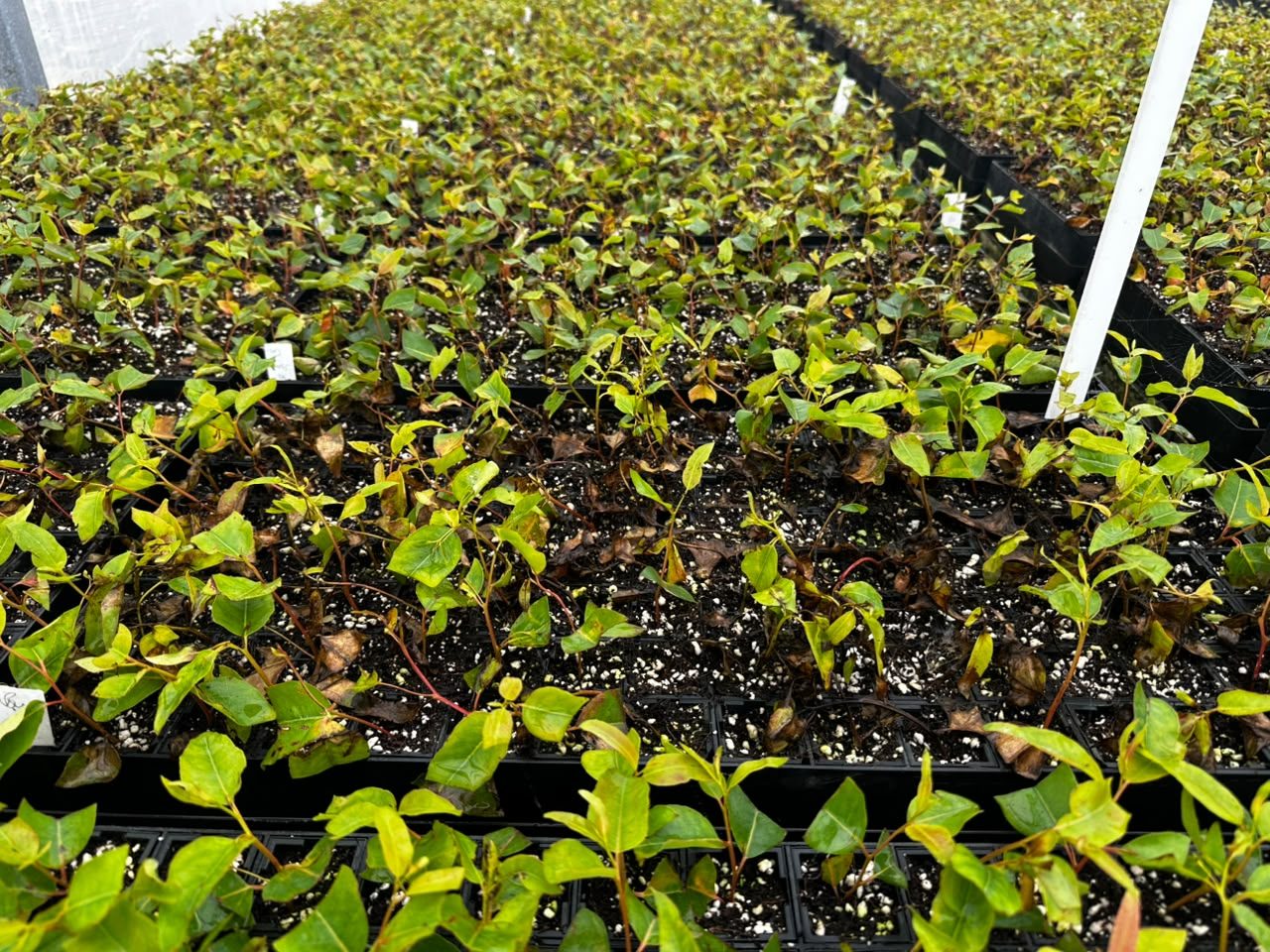 Is something wrong with these?
- Most likely: a fungal leaf blight, such as Calonectria (Cylindrocladium) leaf blight, which spreads quickly in a dense, wet canopy.
- Also possible: Botrytis grey mould; water or heat stress in that part of the tunnel.
- The paler trays behind: could be early signs of the same problem, or a feeding problem. Worth a close look.
Example answer for a real nursery photo. A suggestion, never a diagnosis: somebody else confirms the case.
It spots trouble early, then explains it.
OperoNMS watches your records and raises a warning before a small problem becomes a short order. Press Explain on any warning and OperoAI walks you through it: the rule, its numbers and the records behind it, and what to look at next.
Start every day already knowing.
Switch on the morning briefing and OperoAI writes you a short summary for your role and your nursery at the start of the day, in the app and, if you like, by e-mail.
- What changed since yesterday
- What is late
- The decisions due today
- Three suggested priorities
Every fact in it comes from your records, with links, so the first ten minutes of the day go on decisions, not on searching.
Personal, and off until you want it
Each person switches their own briefing on or off, and chooses whether it also arrives by e-mail. It is ready early every morning, before the first shift starts.
Written for your role
A nursery manager, a production planner and a dispatch clerk each get the summary that matters to their own work, from what their own access lets them see.
Training and onboarding, built in.
The Help assistant: "How do I…?"
Ask how to do anything in OperoNMS and OperoAI answers step by step from the Help pages, with links to the right screen. It answers from the parts of Help that you can read, so a dispatch clerk gets dispatch steps and a planner gets planning steps. New staff learn on the job, and supervisors spend less time explaining menus.
Bring your spreadsheets
Upload your own Excel or CSV file of species, camps, tunnels and beds, customers or opening stock. OperoAI works out which of your columns is which and tidies the file. You see the column matches and a trial run of every row, and nothing is loaded until you confirm.
Powerful, and on a short leash.
OperoAI is built for nurseries whose auditors ask hard questions.
Sees only what you see
Every read is made with your own access, so it can never show you a record, a nursery or a figure your own screens don't.
Nothing without Confirm
It never changes a record or sends a message on its own. You confirm every change, and it is recorded under your name.
No chemicals, no doses
OperoAI never names a chemical product, an active ingredient or a dose. For treatment it says: follow the registered product label and your qualified adviser.
Where your questions go
Questions, photos and the records looked up to answer them are processed by Amazon Bedrock in the European Union. Amazon does not keep them or train on them. The rest of your data stays in Cape Town.
Private conversations
Only the person who asked can see their conversations: not their manager, not OperoSystems. Phone numbers, e-mail addresses and ID numbers are removed, and conversations are deleted after your retention period (90 days unless you choose 7 to 365).
Photos of plants, not people
Location and camera details are removed before a photo is sent, and OperoAI never describes the people in one.
Be one of our first pilot nurseries.
We work closely with a small group of nurseries to set up OperoNMS on their sites. You get hands-on setup and training, your own nursery's layout and recipes loaded with you, and a direct say in what we build next.